Home Documentation Download Pricing Buy Now

[Closed] Gedmo Timestampable not working with multiple fields

0 votes

Hi,

It seems there is no way to add a Gedmo:Timestampable annotation with multiple fields, even if Skipper says the opposite in documentation.

When i try to add two fields with the same name (as you wan see in this screenshot) it generates me only one field in annotation...

Multiple fields in Skipper ORM
Only one field in annotation

Thanks for your support

asked Feb 27, 2018 in Solved by jvgamers (350 points)
recategorized Mar 22, 2018 by ludek.vodicka

Thanks for report. Can you please send me full test project where this issue can be replicated?

Send it to [email protected]

Thanks

Hi, no i can't, it's from a client database.
But i've put screenshot, if you try it i think you will reproduce it directly

1 Answer

0 votes

We just tried this behavior and everything seems to work correctly.

This is export of Skipper project which simulating your described behavior.
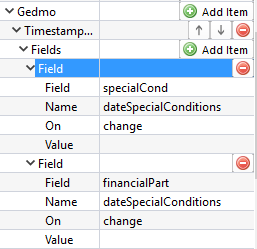
enter image description here

use Doctrine\ORM\Mapping as ORM;
use Gedmo\Mapping\Annotation as Gedmo;

/**
 * @ORM\Entity
 */
class SampleEntity
{
    /**
     * @ORM\Id
     * @ORM\Column(type="integer")
     * @ORM\GeneratedValue(strategy="AUTO")
     */
    private $id;

    /**
     * @ORM\Column(type="string", length=255, nullable=true)
     */
    private $specialCond;

    /**
     * @ORM\Column(type="string", nullable=true)
     */
    private $financialPart;

    /**
     * @ORM\Column(type="date", nullable=true)
     * @Gedmo\Timestampable(on="change", field="specialCond")
     * @Gedmo\Timestampable(on="change", field="financialPart")
     */
    private $dateSpecialConditions;
}

Unfortunately because you don't share any testing project we have to close this ticket as solved.

answered Mar 22, 2018 by ludek.vodicka Skipper developer (140,530 points)
edited Mar 22, 2018 by ludek.vodicka
...